Dragon Center is a powerful software application developed by MSI, a leading manufacturer of gaming hardware. Designed to enhance the gaming experience and optimize system performance, Dragon Center offers a unique set of features that cater to gamers’ needs.
This comprehensive article will delve into the various aspects of Dragon Center, exploring its functionality, benefits, and how it contributes to creating an immersive gaming environment.
About Dragon Center
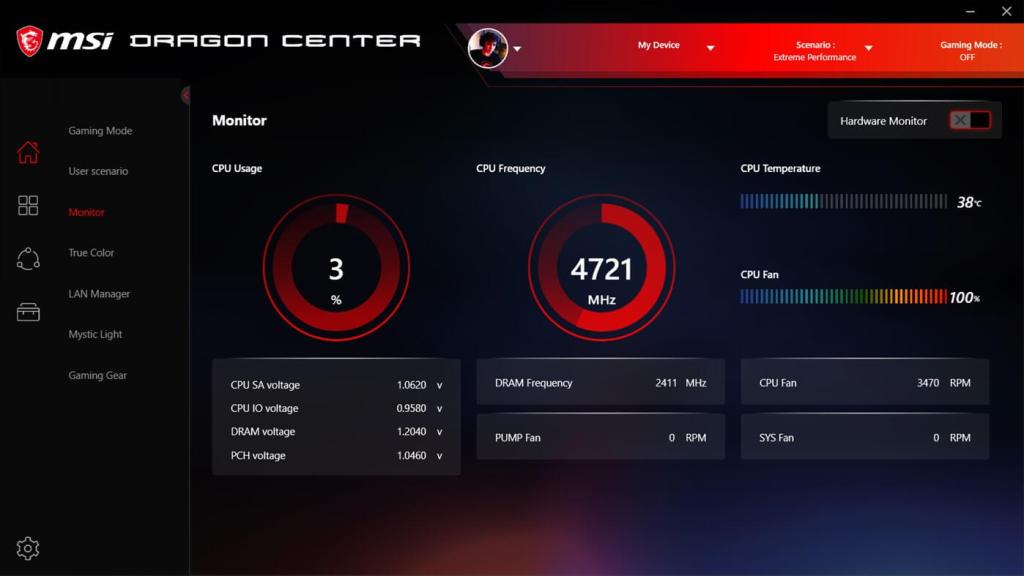
Dragon Center is an all-in-one utility that provides precise control over MSI hardware components, including system monitoring, customization, optimization, and tuning.
It serves as a centralized hub, offering quick access to a wide range of functions. These functions incorporate gaming mode optimization, system temperature monitoring, RGB lighting control, and much more.
Features and Functionalities
System Monitoring: Dragon Center offers real-time monitoring of system parameters, including CPU/GPU utilization, temperature, and fan speed. This feature enables users to keep an eye on their system’s performance and maintain optimal conditions for gaming.
Gaming Mode Optimization: One of the standout features of Dragon Center is its gaming mode optimization. By activating gaming mode, users can prioritize system resources for the best gaming performance. This includes disabling unnecessary background applications, allocating CPU and GPU resources to the game, and boosting overall system performance.
Hardware Customization: Dragon Center allows users to personalize their hardware according to their preferences. With RGB lighting control, users can create stunning lighting effects for keyboards, motherboards, and other peripherals.
Additionally, it offers overclocking tools that enable users to fine-tune their system performance to extract maximum power from their hardware.
Smart Dashboard: The software’s smart dashboard provides an intuitive interface that displays real-time system information, such as CPU and GPU usage, RAM usage, and network speed. This helps users monitor the performance of their system and quickly identify areas that require attention.
Silent Mode: Silent Mode is a feature designed specifically for noise reduction. It adjusts fan speed profiles to reduce the noise generated by fans without compromising system cooling. This is especially useful during intense gaming sessions when fan noise can be distracting.
Intelligent Game Boost: Dragon Center’s Intelligent Game Boost feature optimizes game settings automatically. It analyzes the user’s hardware and adjusts game-specific settings accordingly, ensuring the best possible gaming experience without the need for manual tweaks.
Benefits of Dragon Center
Enhanced Gaming Experience: With Dragon Center, gamers can enjoy an enhanced gaming experience with improved system performance, optimized configurations, and personalized settings. By providing an all-in-one solution, Dragon Center eliminates the need for multiple software applications, streamlining the gaming setup.
Easy Hardware Management: Dragon Center simplifies the management of MSI hardware. Users can access all the necessary tools and settings from a single software interface, saving time and effort.
Extensive Compatibility: Dragon Center is compatible with a wide range of MSI hardware, from motherboards and graphics cards to peripherals like keyboards and mice. This universality allows users to benefit from the software across their gaming setup.
Continuous Updates and Improvements: MSI actively supports and updates Dragon Center, ensuring it remains compatible with new hardware releases and addressing any issues that may arise. Regular updates bring new features and improvements to enhance user experience and fully utilize the potential of MSI hardware.
How to Use Dragon Center?
While Dragon Center offers a wide range of features and functionalities, it is relatively easy to operate. Here’s a step-by-step guide on how to use Dragon Center:
Step 1: Install Dragon Center – First, download and install Dragon Center from its official website. Once the installation is complete, launch the application.
Step 2: Explore the Interface – Dragon Center’s interface is user-friendly and intuitive. The home screen displays an overview of the system status, including system utilization, temperature, and fan speed. From here, users can access other features and functions by clicking on the buttons on the left-hand menu.
Step 3: Monitor System Parameters – To monitor system parameters such as temperature, fan speed, and resource utilization, head over to the System Monitor section. Here, users can view real-time data, set alerts for temperature thresholds, and customize fan curves for optimal cooling.
Step 4: Customize RGB lighting – The RGB LED section enables users to customize RGB lighting for various MSI hardware components. Users can choose from a wide range of effects, color profiles, and brightness levels.
Step 5: Activate Gaming Mode – To activate Gaming Mode, navigate to the Gaming Mode Optimization section. Once in Gaming Mode, the software will optimize the system’s resources for improved gaming performance. This includes resource allocation, disabling background apps, and network optimization.
Step 6: Enable Silent Mode – The Silent Mode feature is accessible from the System Tuner section. This feature reduces fan noise by adjusting fan speed profiles and improves system cooling.
Step 7: Enable Intelligent Game Boost – Navigate to the Intelligent Game Boost section, and the software will analyze the user’s hardware and adjust game-specific settings accordingly. This feature provides an optimal gaming experience without manual tweaking.
Step 8: Update and Maintain – Finally, it’s essential to update Dragon Center regularly to ensure compatibility with new hardware and benefit from updates and new features. Users should also maintain their system by regular cleaning, maintaining software and hardware, and preventing overheating.
FAQs
Q: How can I ensure the safety and stability of my system while using Dragon Center?
A: To ensure the safety and stability of your system, it is crucial to keep Dragon Center and your system drivers up to date. Regularly check for updates on the MSI website and follow best practices for maintaining your hardware and software.
Q: Is it possible to customize fan profiles in Dragon Center?
A: Yes, Dragon Center allows you to customize fan profiles for optimal cooling. In the System Monitor section, navigate to the fan control settings and adjust the fan curve according to your preference. This allows for fine-tuning of system cooling based on temperature thresholds.
Q: Can I use Dragon Center to overclock my hardware?
A: Yes, Dragon Center provides overclocking tools to help users push their hardware to its limits. However, please note that overclocking involves potential risks and should be done with caution. Ensure that you have proper cooling and monitor system temperatures during overclocking.
Q: Can I control the RGB lighting of non-MSI peripherals using Dragon Center?
A: Dragon Center primarily supports MSI peripherals for RGB lighting control. However, some non-MSI peripherals may be compatible with the software. It is recommended to check the compatibility list on the MSI website or the manufacturer’s documentation to confirm if your peripheral is supported.
Q: What should I do if Dragon Center is not detecting my MSI hardware?
A: If Dragon Center is not detecting your MSI hardware, try the following steps:
- Update Dragon Center to the latest version from the official MSI website.
- Ensure that you have installed the latest drivers for your MSI hardware.
- Restart your computer and relaunch Dragon Center.
- If the issue persists, try reinstalling Dragon Center and ensuring proper hardware connections.
Q: Can I use Dragon Center on a laptop?
A: Yes, Dragon Center is compatible with MSI gaming laptops. It provides similar functionalities and features for optimizing system performance, monitoring parameters, and controlling hardware. However, certain features may vary depending on the specific model.
Q: Can I uninstall Dragon Center without affecting my MSI hardware?
A: Yes, you can uninstall Dragon Center without affecting the performance of your MSI hardware. However, keep in mind that you will no longer have access to Dragon Center’s features and functionalities, such as system monitoring, gaming optimizations, and RGB lighting control.
Conclusion
Dragon Center offers a comprehensive suite of features and functions that cater specifically to gamers. By providing efficient hardware management, customization options, and game optimization tools, it enhances the gaming experience to a whole new level. With its continuous development and updates, Dragon Center stands as an indispensable companion for MSI users, empowering gamers to unleash the full power of their MSI hardware.
 Dragon Center